
When you're shopping for a gaming mouse, you'll likely come across specifications like DPI, sensor type, and polling rate. While DPI tends to steal the spotlight, polling rate is actually one of the most important specifications for how responsive your mouse feels. Understanding what polling rate means and how it impacts your gaming experience can help you make better decisions when choosing your next mouse.
What is Polling Rate?
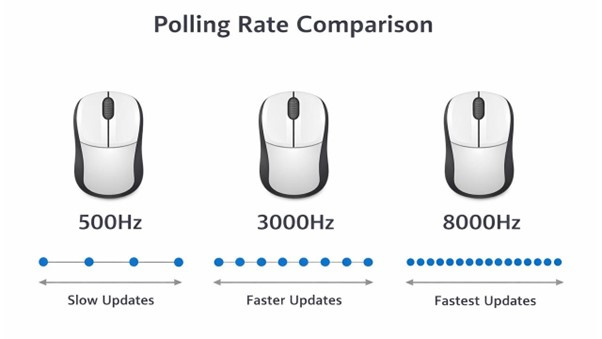
Polling rate refers to how often your mouse reports its position to your computer. It's measured in Hertz (Hz), which indicates the number of times per second the mouse sends data to your PC. A mouse with a 125Hz polling rate communicates with your computer 125 times per second, while a 1000Hz mouse reports its position 1000 times per second.
Think of it like a conversation where your mouse is constantly updating your computer about where it is and what it's doing. The higher the polling rate, the more frequently these updates occur, which means your computer gets fresher, more current information about your mouse movements.
The Mathematics Behind It
Another way to understand polling rate is through response time, which is the inverse of the polling rate. A 125Hz polling rate means your mouse updates every 8 milliseconds, a 500Hz mouse updates every 2 milliseconds, and a 1000Hz mouse updates every single millisecond. These might seem like tiny differences, but in fast-paced gaming scenarios, milliseconds can matter.

Common Polling Rate Values
Most mice operate at one of several standard polling rates. Budget and office mice typically run at 125Hz, which is perfectly adequate for everyday tasks like browsing the web, working in documents, and general computer use. Mid-range mice often support 500Hz, offering a noticeable improvement in responsiveness. Gaming mice usually default to 1000Hz, which has become the standard for competitive gaming.
Recently, some manufacturers have pushed beyond the traditional 1000Hz limit. High-end gaming mice now offer 2000Hz, 4000Hz, or even 8000Hz polling rates. These ultra-high polling rates are marketed as providing the absolute cutting edge in responsiveness, though as we'll discuss later, the benefits become less noticeable at these extreme levels.
Does Polling Rate Actually Affect Gaming?
The Short Answer
Yes, polling rate does affect gaming, but the degree of impact depends on what games you play and your skill level. The difference between 125Hz and 1000Hz is significant and noticeable to most players. However, the jump from 1000Hz to higher rates offers diminishing returns that only the most competitive players might appreciate.
Where Polling Rate Matters Most
First-person shooters are where polling rate has the most obvious impact. In games like Counter-Strike, Valorant, or Apex Legends, precise aim and quick flick shots benefit from higher polling rates. The more frequently your mouse reports its position, the smoother and more accurate your crosshair movements become. This can be the difference between landing a headshot and missing entirely.
Fast-paced competitive games in general benefit from higher polling rates. MOBAs like League of Legends or Dota 2, where precise clicking and quick cursor movements are essential, see improvements with higher polling rates. The same applies to rhythm games, where timing is everything, and even real-time strategy games where you're constantly selecting units and issuing commands.
However, slower-paced games like turn-based strategy titles, puzzle games, or story-driven adventures won't see much benefit from high polling rates. In these cases, a standard 500Hz or even 125Hz mouse would work perfectly fine.
The Trade-offs of Higher Polling Rates
While higher polling rates sound universally better, there are some considerations to keep in mind. Higher polling rates require more CPU resources. Your computer needs to process more frequent updates from your mouse, which means slightly higher CPU usage. On modern systems, the difference is negligible at 1000Hz, but at extreme rates like 8000Hz, you might see a measurable increase in CPU overhead.
Some users report mouse cursor jitter or instability at very high polling rates, especially if their USB controller or motherboard isn't up to the task of handling the data throughput. This is rare with 1000Hz but can become more common with 2000Hz and above.
Battery life is another consideration for wireless mice. A wireless mouse running at 1000Hz will drain its battery faster than one running at 500Hz or 125Hz. Many wireless gaming mice include adjustable polling rates for this reason, letting you choose between maximum performance when plugged in or charging, and better battery life when running wirelessly.
What About 8000Hz and Beyond?
The gaming peripheral industry has entered something of a polling rate arms race, with manufacturers now offering mice that poll at 2000Hz, 4000Hz, and even 8000Hz. Are these worth it? The honest answer is that for most players, probably not.
The human eye and hand coordination system has limits. At 1000Hz, your mouse is already updating every millisecond, which is faster than most people can perceive or react to. Professional esports players might benefit from the absolute minimum input lag that 8000Hz provides, but the average gamer likely won't notice a difference between 1000Hz and 8000Hz in actual gameplay.
These ultra-high polling rates are more about marketing and future-proofing than practical benefits. They also come with premium price tags. Unless you're competing at the highest levels or simply want the absolute best specifications available, sticking with a quality 1000Hz mouse is perfectly reasonable.
How to Check and Change Your Polling Rate
Most gaming mice come with dedicated software from the manufacturer that lets you adjust the polling rate. Brands like Logitech, Razer, and SteelSeries all include polling rate adjustments in their respective software suites. You'll typically find it in the performance or advanced settings section.
If you want to check your current polling rate without manufacturer software, there are online tools and small programs that can measure how often your mouse is reporting to your computer. These can be useful for verifying that your mouse is actually running at its advertised polling rate.
Should You Upgrade for Higher Polling Rate?
If you're currently using an old office mouse or a budget gaming mouse with 125Hz polling rate, upgrading to a mouse with 1000Hz polling will provide a noticeable improvement in responsiveness, especially in competitive games. The difference is real and worthwhile for anyone who takes gaming seriously.
However, if you already have a mouse running at 1000Hz, there's little reason to upgrade solely for higher polling rates. Improvements beyond 1000Hz offer minimal real-world benefits for the vast majority of gamers. You'd likely see bigger improvements from better sensor technology, more ergonomic design, or lighter weight.
The Bottom Line
Polling rate is an important specification that genuinely affects your gaming experience, but like many aspects of PC gaming, there's a point of diminishing returns. A 1000Hz polling rate has been the sweet spot for years and remains excellent for competitive gaming. While higher rates exist and offer marginal improvements, they're not necessary for most players.
When choosing a gaming mouse, polling rate should be one consideration among many, including sensor quality, weight, shape, button placement, and build quality. A comfortable mouse with a good sensor at 1000Hz will serve you better than an uncomfortable mouse at 8000Hz. Focus on the complete package rather than chasing the highest polling rate number.