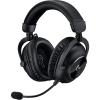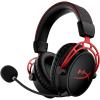

Whether you're shopping for your first headset or looking to upgrade your setup, you've probably noticed that some headsets are marketed for PlayStation, others for Xbox, and others specifically for PC.
These labels can feel like marketing fluff, but they do point to some real and meaningful differences in how these headsets are designed and how they work. Understanding those differences will help you make a smarter buying decision, no matter what platform you're on.
How They Connect
The most important difference between console and PC headsets is how they connect to your device, because not every connection method works on every platform.
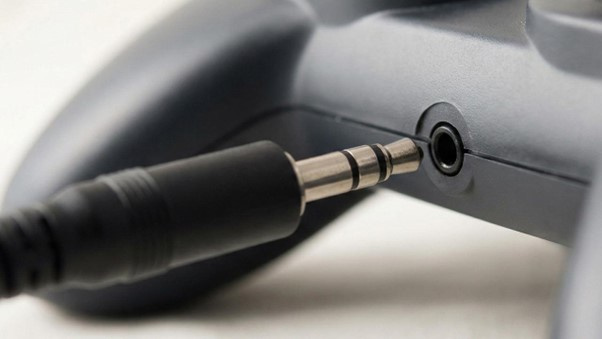
3.5mm Analogue Jack
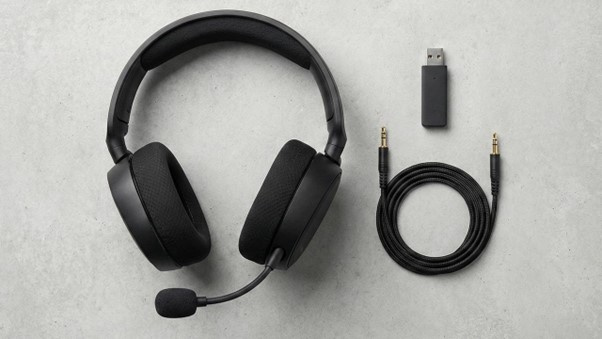
The 3.5mm analogue jack is the most universal option. It works on PC, PlayStation, Xbox, Nintendo Switch, and even your phone, making any headset that uses it genuinely cross-platform. If simplicity and flexibility matter to you, this is the connection type to look for.
USB
USB is where things get more platform-specific. A USB headset plugged into a PC communicates directly with the operating system, which unlocks software features like equalisers, surround sound processing, and microphone tuning. Plug that same headset into a PlayStation and it may still function, but many of those software features simply won't be available. Xbox consoles have historically had limited USB audio support, though this has improved in recent years.
Wireless Dongles
Proprietary wireless dongles are common in premium headsets and are often locked to a specific platform. A PlayStation wireless headset dongle, for example, typically won't pair with an Xbox.
Bluetooth
Bluetooth is becoming more common too, though gaming headsets traditionally avoided it due to audio latency. Modern Bluetooth has improved significantly, and some headsets now combine Bluetooth with a low-latency proprietary connection for the best of both worlds.
Audio Quality and Processing
The audio hardware inside most headsets, meaning the drivers or speaker components inside the ear cups, isn't inherently better or worse based on which platform the headset targets. A mid-range headset is a mid-range headset regardless of the box it comes in. What does differ is how each platform processes and delivers that audio.
On PC, you have access to software like Dolby Atmos, DTS Headphone:X, and manufacturer companion apps that let you tune the sound in real time. You can adjust bass levels, enable surround sound simulation, and apply microphone filters, giving you a lot of control over your experience.
On consoles, much of the audio processing is handled by the console itself rather than the headset. PlayStation's Tempest 3D Audio engine on the PS5 does an impressive job of creating spatial audio without needing expensive headset hardware to support it. Xbox integrates with Windows Sonic and Dolby Atmos at the system level in a similar way.
The practical takeaway is that a mid-range headset can sound excellent on a console because the console does a lot of the heavy lifting for you. On PC you get more control, but that also means more room for things to sound underwhelming if you don't take the time to set everything up properly.
The Microphone and Chat Systems
The microphone is another area where console and PC headsets handle things differently, and it's one of the more frustrating pain points for anyone who tries to use a headset across platforms.
On PC, the operating system treats the microphone as a standard audio input device. You can adjust it through Windows settings, your headset's companion app, or third-party software. This gives you fine-grained control over how your voice sounds to other players.
On consoles, voice chat is routed through the platform's own system, whether that's PlayStation Network or Xbox Live. Console headsets are specifically tuned to work within that ecosystem. Features like sidetone, which lets you hear your own voice in the headset so you don't end up shouting, and game-to-chat audio mixing are often handled at the hardware level in console headsets and may not carry over when you plug them into a PC.
Is It Just Marketing?
Sometimes, yes. Many budget and mid-range headsets are essentially identical hardware with different packaging, and manufacturers know that "PlayStation 5 Compatible" sells units on gaming shelves. However, premium headsets genuinely are optimised for specific platforms. The SteelSeries Arctis Nova Pro Wireless, for example, comes in distinct PlayStation and Xbox variants with different wireless technology inside. They are not interchangeable, and the PC version supports a completely different software stack.
The general rule is that the cheaper the headset, the less the platform label matters. The more premium the headset, the more likely those platform-specific differences are real and worth paying attention to.
Which Should You Buy?
If you game primarily on one console and want a plug-and-play experience without fussing over software settings, a console-specific headset is a solid choice. If you game on PC and want deep customisation, or you rely on voice chat software like Discord, a PC-focused headset will serve you better.
If you game across multiple devices, the best option is a multi-platform headset. Look for models that use a 3.5mm connection or offer multiple connection modes. Brands like SteelSeries, HyperX, and Logitech G all make excellent options that work well across platforms without compromise.
The Bottom Line
The difference between console and PC gaming headsets comes down to how they connect, how the audio is processed, and how much control you want over the experience. Consoles do more of the work for you, which keeps things simple and accessible. PCs give you more power and flexibility, but require a bit more effort to get the most out of. For most people, a quality multi-platform headset is the most practical investment, giving you great sound whether you're on a console, a PC, or switching between both.